
For my digital marketing class at the University of Michigan-Dearborn, every student was given the same task, build a website from scratch and reach the top of Google for two assigned keywords. These keywords were “Michigan SEO tactics with AI workflows” and “AI techniques for Michigan marketers.”
One of the first things I did was look up the words in Google Keyword Planner, filtered for Michigan and non-brands. I received around 1,500 keyword ideas, but neither of the keywords actually appeared in the list. It was confusing at first. I wasn’t exactly sure what it meant. Eventually, I learned that it doesn’t mean no one searches for them. It usually means that the phrase is too specific for Google themselves to report.
If you are going through this same issue, you are in the right place. Zero searches does not necessarily mean zero demand. Do not give up on it! Use the Download Keyword ideas button in Keyword Planner to save your results as a spreadsheet, look for related terms that do have real search volume, and use them to shape your page. Below, you can see exactly how I did that, step by step.
What is Google Keyword Planner?
Google Keyword Planner is a free tool in Google Ads that helps advertisers research keywords for their search campaigns. You can use this tool to enter words that are related to your business and find new keyword ideas. You can also see how many searches a keyword may get in a month and how much it could cost to advertise on it. To find it, go to Google Ads → Tools → Planning → Keyword Planner. Because the numbers come from Google’s own search data, it is more reliable than asking AI or simply guessing which keywords may be popular.
Choosing the right keywords matters because it helps your page reach closer to the top of Google for the words people actually search, which makes them more likely to click on your site and take the action you want, like calling, buying, reading, or more. According to a 2020 SISTRIX study of over 80 million keywords, the first organic result on Google gets about 28.5% of total clicks, while the third result gets only 11%. That means that moving up even a few spots can more than double the number of people who may visit your site, which is why picking the right keywords from the start matters so much.
Why Does Keyword Planner Show No Data for Some Keywords?
The keywords assigned to me for this project are what marketers like to call long-tail keywords. This is just a fancy word for more specific phrases that get fewer searches but usually come from people who have a clear goal in mind. That is also a reason why they often convert better than short-tail keywords. However, the downside to this is that when a phrase is too specific, not many people search it word for word. This means that the Keyword Planner may barely report it. When I searched my keywords on the planner, the data only showed 0-10 searches a month for each, with no bid estimates and no competition data. It even suggested broader terms like “Michigan SEO,” “SEO tactics” and “AI techniques,” which is similar to where I started.
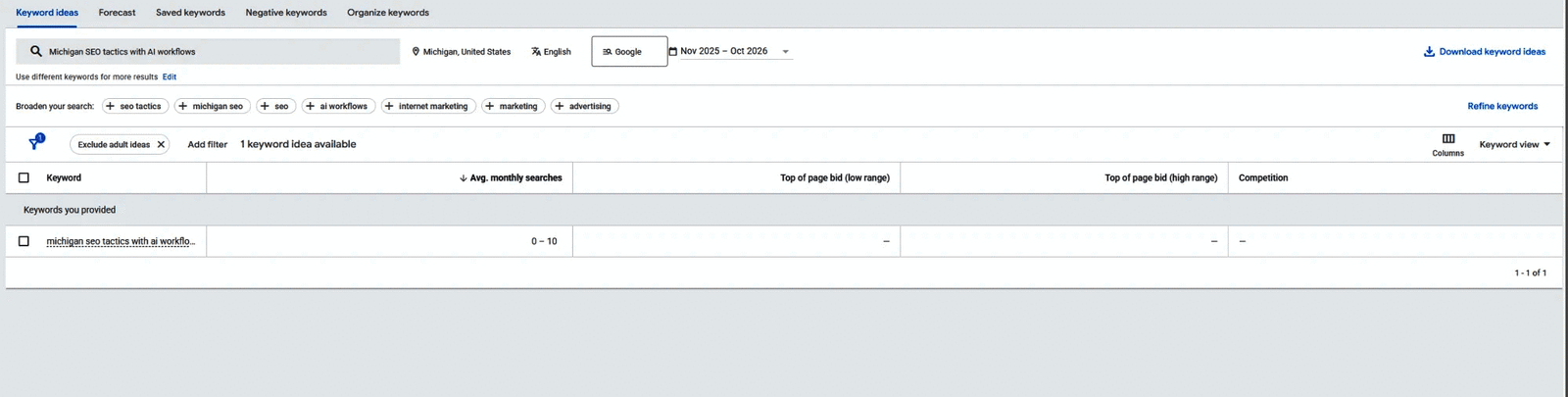
Even for the keywords that showed up when I searched for broader terms, I did not see exact numbers. Keyword Planner showed ranges such as 10-100 or 100-1K searches a month. That is because Google only shows exact search volumes to accounts that are actively spending money on ads. Any accounts with little to no ad spend, such as the account my class shared, only see rounded ranges.
What Should You Do When Your Keyword Shows Almost No Searches?
When your keyword shows almost no searches, try to use broader terms. Start with shorter keywords that are related to your business and let Keyword Planner find related ideas for you. In fact, as you can see in my screenshot, Keyword Planner recommended broader terms on its own because my keyword was too long.
Here is what I did:
- Entered 10 broader seed keywords, like “Michigan SEO,” “AI marketing” and “local SEO”
- Filtered the results for Michigan and English, using the last 12 months of data
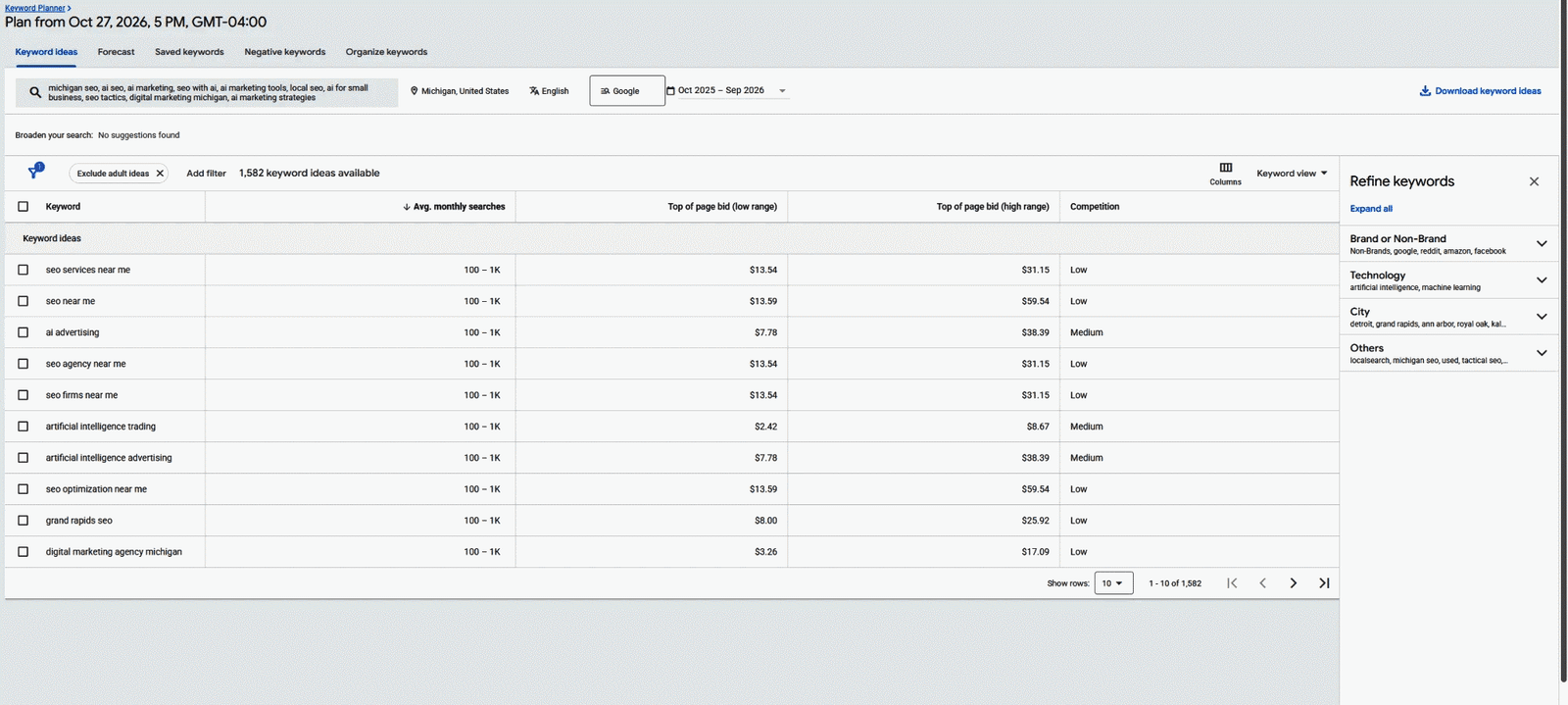
- Looked through the 1,582 keywords it gave me.
- Picked related terms with real searches, like “AI for SEO” and “AI marketing tools” (10-100 a month) and “AI advertising” (100-1K a month), and used them to shape my pages.
However, instead of making a separate page for every phrase, I used keyword clustering. This is the idea of grouping together related terms and matching each group to whatever page fits the best. For example, SEO terms like “AI for SEO” and “local SEO Michigan” went on my Michigan SEO page, while marketing terms such as “AI marketing tools” and “AI advertising” went on my AI techniques page. Don’t believe me? Go check it out for yourself!
This way, each page covers its topic fully instead of competing with itself.
Does a High Search Volume Mean It’s a Good Keyword?
Not always. While looking through my results, I noticed terms like “SEO near me” and “Grand Rapids SEO” had more searches, about 100-1K a month each. But the people searching those words are probably looking to hire an SEO company nearby, and my pages are guides for people who want to learn. This is called search intent, which is what the searcher actually wants. A keyword is only worth targeting if it matches what your page offers. Lots of searches from the wrong audience won’t bring you the right visitors.
Key Takeaway
The biggest lesson I learned from this is that almost no searches does not mean no opportunity. Start broad, pick related terms people actually search, and match them to what your page offers. I use this same process in my guide to AI for SEO for Michigan businesses.
References
- Google Keyword Planner data (Michigan, English), searched by the author, October–November 2026.
- https://www.sistrix.com/blog/why-almost-everything-you-knew-about-google-ctr-is-no-longer-valid/
- https://www.searchenginejournal.com/google-first-page-clicks/
- https://support.google.com/google-ads/answer/7337243